{inter}National Scrapbooking Day Buy One Get One Free

To celebrate {inter}National Scrapbooking Day you can Buy One Get One Free.

Mother's-Little-Helper-Sales

Just purchase my brand new photo retouching class – Mother’s Little Helper for 40% off and you’ll also receive a coupon for $30 to spend on your choice of workshop. That’s $60 value for just $17

[Read more...]

Fabulous Photos Workshop – Selective Coloring

In this post, Cheryl shares a photograph she made fab using the techniques she learnt in the Fabulous Photos workshop

Have you noticed photographs online that are black and white, yet have one special part of the photo that is in color?

Melissa teaches exactly how easy it is to do in her Fabulous Photos Workshop. I was able to attend the Live Fabulous Photos Online Webinar and she showed us how it’s done. So I wanted to share with you how my attempt turned out.

This is my original. I’m a collector of all things old and this is a photo of a few of my jars.

And here’s my photo after following Melissa’s selective coloring tutorial.  I am so very much loving this image!

You can learn how to do this yourself.  It was much more than just learning how to do it, it was FUN as well!

Learn to make your own hand tinted photo [Read more...]

New Shutterfly DigiScrap Style Makes it Easy to Create a Photobook
Shutterfly has just released a new photobook style for Digital Scrapbookers – see it in action here:

This style has full bleed photo spots for the cover spine, title page, and inside pages. So all you need to do is upload your layouts and drag them on.

If you want to learn more about printing with Shutterfly – why not join me for In Print. [Read more...]

Save 60% on Top 10 Text Tips at Digi Grab

Learn some trendy text effects to boost your titles and journaling!

This workshop covers one of your most requested topics,  text techniques for digital scrapbooking.

Watch as I show you the top techniques to give your titles and journaling a boost using Photoshop Elements.

text-tips-digigrab1

Until January 25th you can save $32 on

You will come away with:

  • An understanding of how the type tool works in Photoshop Elements
  • Step by step instruction on 10 ways to add style and creativity to text on your page
  • High definition video recording
  • Handout including the slides and links mentioned in the workshop

All this for only $8

Buy today  with coupon code TEXTGRAB - this deal is only valid until 25 January 2013

Need help redeeming your coupon?

Here’s all the details and video to show you how

Start the new year with a clean slate

Are you ready to clear that backlog of photos?

Join me in the class that has helped hundreds of scrapbookers create meaningful photobooks.

In just 25 minutes you can learn how to use Shutterfly’s shutterfly-photobooknew custom path system (it sounds trickier than it is!)

These photobooks contain designer elements (from the likes of Ali Edward) to help you make it just as gorgeous as your scrapbook pages.
AND there’s a bonus video to show you how you can create your own Project Life book using Becky Higgin’s digital kits right inside Shutterfly without it costing you a cent for supplies.

If you’d love to have photobooks that are just as gorgeous as your scrapbooks, and take half the time to create – you should check out Photobook Perfection

It’s just $14 right now. So you can spend the extra money on a few extra pages in your photobook!

Buy today and get your photos off the computer and into your hands.

snapshot (1)


This special offer on the class ends 16 January 2013.

Save $15 on Creative Gift Ideas at DigiGrab
Gift ideas that you can make with digital supplies!

Be prepared for an inspiration hit as you watch this hour long workshop and look through the gallery of gift ideas you can make with digital supplies. I’ll teach you how create  custom gifts using Photoshop Elements. Think photo collages, canvases, gift boxes, gift card holders, and more.  Head on over to DigiGrab now!

Until November 15th you can save $15 on

  • Display of photo gifts/hybrid gifts
  • Walk-through and templates for a calendar
  • Tips on creating other gifts with your supplies

All this for only $5

Buy today – this deal is only valid until 15 November 2012

Digital Gifts for Christmas: 2013 Calendar and more
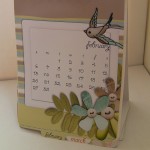
Still trying to come up with a gift for the person who has everything?

Why not create a digital gift this year?  These type gifts always mean so much more because they’re created from the heart!

A calendar for the new year is always a hit and you can create and personalize it for that special person or persons on your list.

A walk-through and templates for this customisable 2013 calendar are provided with the Digital Gift Ideas Workshop as well as other gifts and related gift-giving fun. [Read more...]

Photoshop Elements 11: First Look Recording
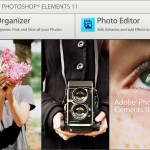
We’ve just finished taking our first look at Photoshop Elements 11. It’s great to see that so many of you were keen to join me for an inside look.

In case you missed it:

Photoshop Elements 11 in High Resolution

Click on the button at the bottom right  to watch in beautiful high definition!

Links to Products Mentioned

Here’s the slides, including a link to the upgrade features table for Photoshop Elements

Photoshop Elements 11 First Look

Should I upgrade?

You can now upgrade your photo editing software for between $70 and $120 depending on where you are in the world. $122.38 for Aussies.

I feel that if you have Photoshop Elements 8 or earlier it is worth the upgrade. You will love the built in mask support and text on a path, plus the Organizer is much more stable than the PSE8 version.

For PSE9 or 10 users, not so much… unless

  1. You use the Photoshop Elements Organizer
  2. You use styles or actions
  3. You have bought styles or actions and don’t use them because you couldn’t work out how to get them installed correctly

What is your favourite feature? Biggest gripe?

Share in the comments below

Want to Learn Photoshop Elements 11 Organizer in more detail? [Read more...]

Hot Off the Press: Fabulous Photos Workshop Special Offer
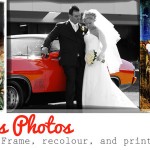
We’ve just finished out Fabulous Photos live workshop and had a blast learning some of the fun ways to beautify our photos.

Buy Fabulous Photos + get a bonus Shutterfly Book

Register for VIP access to secure your own copy of the workshop recording and handouts + BONUS  Shutterfly book – valued at $29.99!


Learn Photoshop Elements while improving and beautifying your photos.

I’ll show you how you can use Photoshop Elements to create gorgeous photo effects without the fuss.

You’ll leave with the confidence to create on your own.

What you will learn:

  • How to add journalling to a photo
  • How to add a frame or distress the edges of your photo
  • How to add pops of colour to a black and white image
  • How to print multiple photos on one page

This will be an introductory workshop on Photoshop Elements – you’ll be learning while you improve your existing photos for use in your scrapbooking, either paper or digital. [Read more...]

Fabulous Photos Online Workshop

Learn Photoshop Elements while improving and beautifying your photos.

I’ll show you how you can use Photoshop Elements to create gorgeous photo effects without the fuss.

You’ll leave with the confidence to create on your own.

Join Melissa to learn:

  • How to add journalling to a photo
  • How to add a frame or distress the edges of your photo
  • How to add pops of colour to a black and white image
  • How to print multiple photos on one page

Cost $60 per person only $30

This workshop was run live for $60 – but I’ve slashed the price for my online participants. Get in while the discount sticks!


[Read more...]

Related Posts Plugin for WordPress, Blogger...