In this post, Cheryl shares a photograph she made fab using the techniques she learnt in the Fabulous Photos workshop
Have you noticed photographs online that are black and white, yet have one special part of the photo that is in color?
Melissa teaches exactly how easy it is to do in her Fabulous Photos Workshop. I was able to attend the Live Fabulous Photos Online Webinar and she showed us how it’s done. So I wanted to share with you how my attempt turned out.
This is my original. I’m a collector of all things old and this is a photo of a few of my jars.
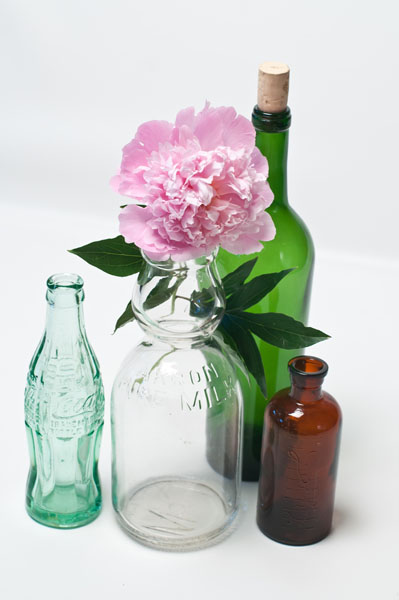
And here’s my photo after following Melissa’s selective coloring tutorial. I am so very much loving this image!
You can learn how to do this yourself. It was much more than just learning how to do it, it was FUN as well!
Learn to make your own hand tinted photo
Learn Photoshop Elements while improving and beautifying your photos.
Melissa shows you how you can use Photoshop Elements to create gorgeous photo effects without the fuss.
You’ll leave with the confidence to create on your own.
What you will learn:
- How to add journalling to a photo
- How to add a frame or distress the edges of your photo
- How to add pops of colour to a black and white image
- How to print multiple photos on one page
This will be an introductory workshop on Photoshop Elements – you’ll be learning while you improve your existing photos for use in your scrapbooking, either paper or digital.

What you’ll receive
- An easy to follow introductory workshop on using Photoshop Elements
- A full colour handout
- Workshop slides
- 10 High quality video of practical techinques
What to bring Some photos you love and your computer with Photoshop Elements 6 or up
Buy today and receive Fabulous Photos + Introducing Scrapbooking ebook
Get it all for just $30
- How to add journaling to a photo
- How to add a frame or distress the edges of your photo
- How to add pops of colour to a black and white image
- How to print multiple photos on one page


